Thread Model
summon uses Slack threads to organize Claude's output. Each Claude turn gets its own thread, keeping the main channel readable while preserving full detail in threads.
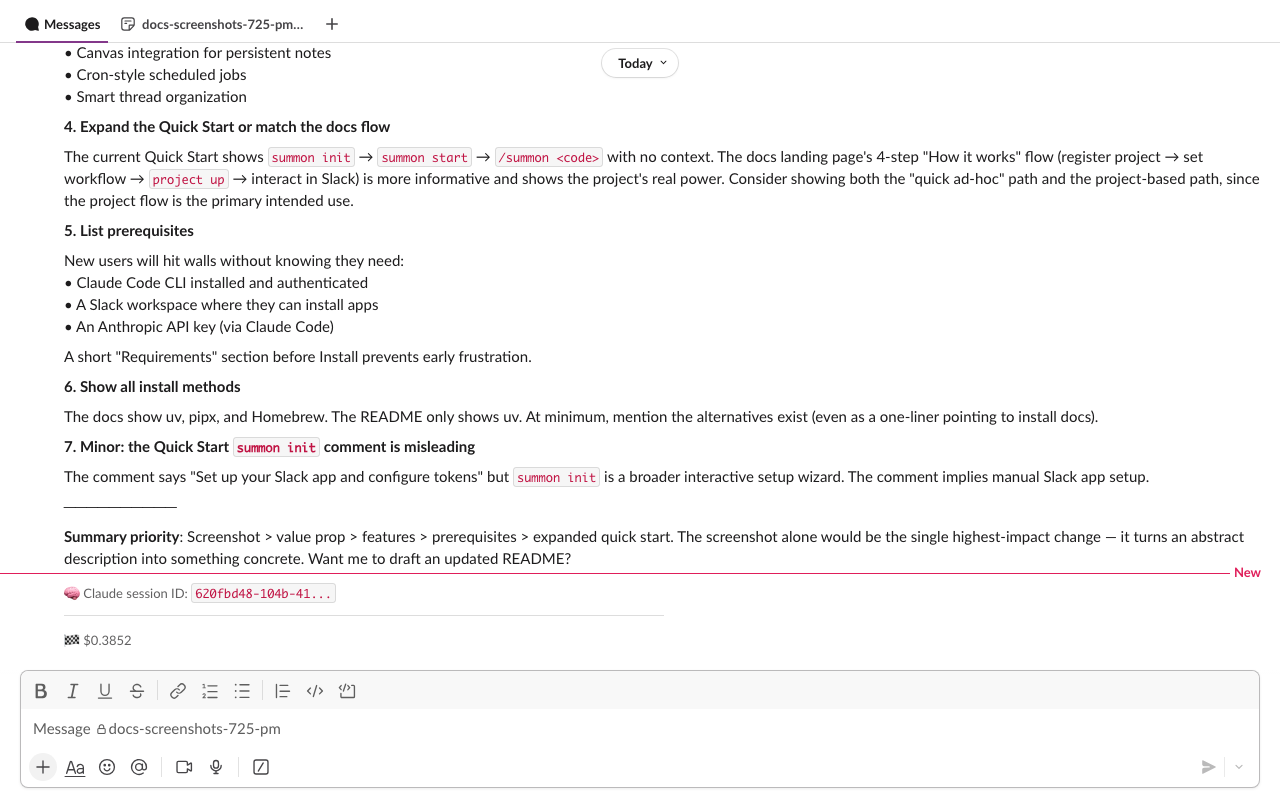
Channel structure
Each session has one dedicated Slack channel. Within that channel:
- Main channel — user messages, Claude's final answers, turn markers, permission pings
- Turn threads — tool calls, tool results, intermediate reasoning, thinking blocks
- Subagent threads — nested under the turn thread when Claude uses the
Tasktool to spawn subagents
Turn lifecycle
Starting a turn
When you send a message, summon posts a turn starter message to the main channel:
Turn 3: re: _fix the login bug_...
This message anchors the thread. All tool activity for this turn appears as replies to it. The turn number increments with each user message.
During a turn
While Claude is working:
- Tool use — each tool call appears in the turn thread as a context block:
:hammer_and_wrench: Edit `src/auth/login.py` - Tool results — a brief success indicator follows each tool call
- Diffs — for
EditandWritetool calls, a unified diff is uploaded to the thread as a Slack file snippet with syntax highlighting - Intermediate text — text Claude produces between tool calls appears in the turn thread in real time
The thread status indicator (visible in Slack's thread list) updates to show what Claude is doing: Thinking..., Running Bash..., Running Edit..., etc.
Ending a turn
When Claude finishes:
- The final response text is posted to the main channel (not the thread), @-mentioning you
- The turn starter message is updated with a summary:
Turn 3: re: _fix the login bug_ | 4 tool calls · login.py, token.py · 18k/200k (9%) - The thread status indicator is cleared
The summary shows: tool call count, files touched (up to 3 names + overflow count), and context window usage (tokens used / window size / percentage).
Routing heuristic
Text blocks are routed differently depending on where they appear in a turn:
| Situation | Destination |
|---|---|
| Text before any tool call | Main channel (streaming, updated in place) |
| Text after a tool call | Turn thread (intermediate), then main channel (conclusion) |
Text from a subagent (parent_tool_use_id set) |
Subagent thread |
| Conclusion after tool calls | Main channel with @-mention |
This means simple Q&A turns (no tools) post directly to the main channel. Agentic turns (with tool use) keep the main channel clean and route detail to threads.
Message reaction lifecycle
summon adds emoji reactions to your Slack message to show turn status at a glance:
| Reaction | Meaning |
|---|---|
 |
Message received, preprocessing in progress |
 |
Turn in progress (Claude is working) |
 |
Turn completed successfully |
 |
Turn cancelled by !stop command |
 |
Turn ended with an error |
The sequence: :inbox_tray: is added when the message arrives, then swapped for :gear: when Claude starts the turn, then swapped for the outcome emoji when the turn ends.
Ultrathink reaction
If your message contains a thinking trigger (ultrathink, think harder, etc.), a  reaction is also added permanently to your message.
Thread status indicator
The thread status shown in Slack's sidebar reflects what Claude is doing during a turn:
| Status text | When shown |
|---|---|
Thinking... |
Turn started, Claude is reasoning |
Thinking deeply... |
Extended thinking block active |
Running {ToolName}... |
Tool call in progress |
| (empty) | Turn complete |
Status is set via the Slack API thread status slot. It auto-clears when a new message is posted to the thread, and is explicitly cleared at turn end.
Subagent threads
When Claude uses the Task tool to spawn a subagent, summon creates a nested thread under the current turn thread. The subagent's task description becomes the thread starter:
[Subagent] Analyze authentication flow and identify security issues
All tool calls, results, and text from the subagent are routed to this nested thread. The parent turn thread shows only the Task tool invocation and its final result.
Multiple subagents spawned in parallel each get their own nested thread.
Thinking blocks
When Claude uses extended thinking (effort high or max, or when SUMMON_ENABLE_THINKING=true), thinking content is handled separately from response text:
- By default (
SUMMON_SHOW_THINKING=false): thinking blocks are silently discarded — only the final response is shown. - With
SUMMON_SHOW_THINKING=true: thinking content is posted to the turn thread as a collapsible context block with a prefix.
Long thinking content (over SUMMON_MAX_INLINE_CHARS characters, default 2500) is uploaded as a file rather than posted inline.
Long content handling
When Claude produces output longer than SUMMON_MAX_INLINE_CHARS characters (default 2500):
- Text is uploaded as a Slack file snippet rather than posted inline
- Code files written by the
Writetool are uploaded with appropriate syntax highlighting based on file extension - Markdown files written by the
Writetool are rendered using Slack'stype: markdownblocks (12K char limit per block, split automatically) - Diffs from
Editcalls are uploaded asdiff-type snippets with colored +/- lines
Streaming and flush rate
Claude's response text streams in real time. summon buffers incoming text and flushes to Slack every 2 seconds to stay within Slack's rate limits (Tier 3: ~1 message/second per channel). During a turn:
- The main channel message is updated in place as text arrives
- At 3000 characters, a new message is started automatically
- Code fences are tracked — if a split would occur inside an open
```block, the fence is closed at the split point and re-opened in the next message
Turn footer
After each turn, summon posts a turn footer to the main channel as a Slack context block:
:checkered_flag: $0.0342 · 21% context
This shows the cumulative turn cost (input + output tokens) and context window usage percentage.
Context warnings
As context usage climbs, summon posts escalating warnings:
| Threshold | Action |
|---|---|
| 75% | Warning posted to the session channel |
| 90% | Urgent warning posted |
| 95% | !compact triggered automatically |
If auto-compact fires, summon restarts the Claude session with a summarized context. Use !compact manually before reaching 95% to control the summary instructions.